Source
Supabase live template
Delivery
Sent email
Last sent May 9, 2026
Updated
Apr 22, 2026
Visuals
7 image assets
Version 1.21.
Main Context
AI Orientation
Day 1: AI basics, use cases, and levels of usage
What you'll see today:
- Viral example of using AI to make money $$$
- What is AI?
- How do people use AI today?
- Levels of using AI
- Course Topics
- Your AI usage
- How do you use it today?
- Are there anythings you want to learn?
Viral example of using AI to make money
Before we get into any theory, I want to show you something. Instead of chatting or prompting with AI, this guy has created an entire system that puts together a bunch of different pieces of AI from having it research, to creating images, to even sending mail through an online provider.
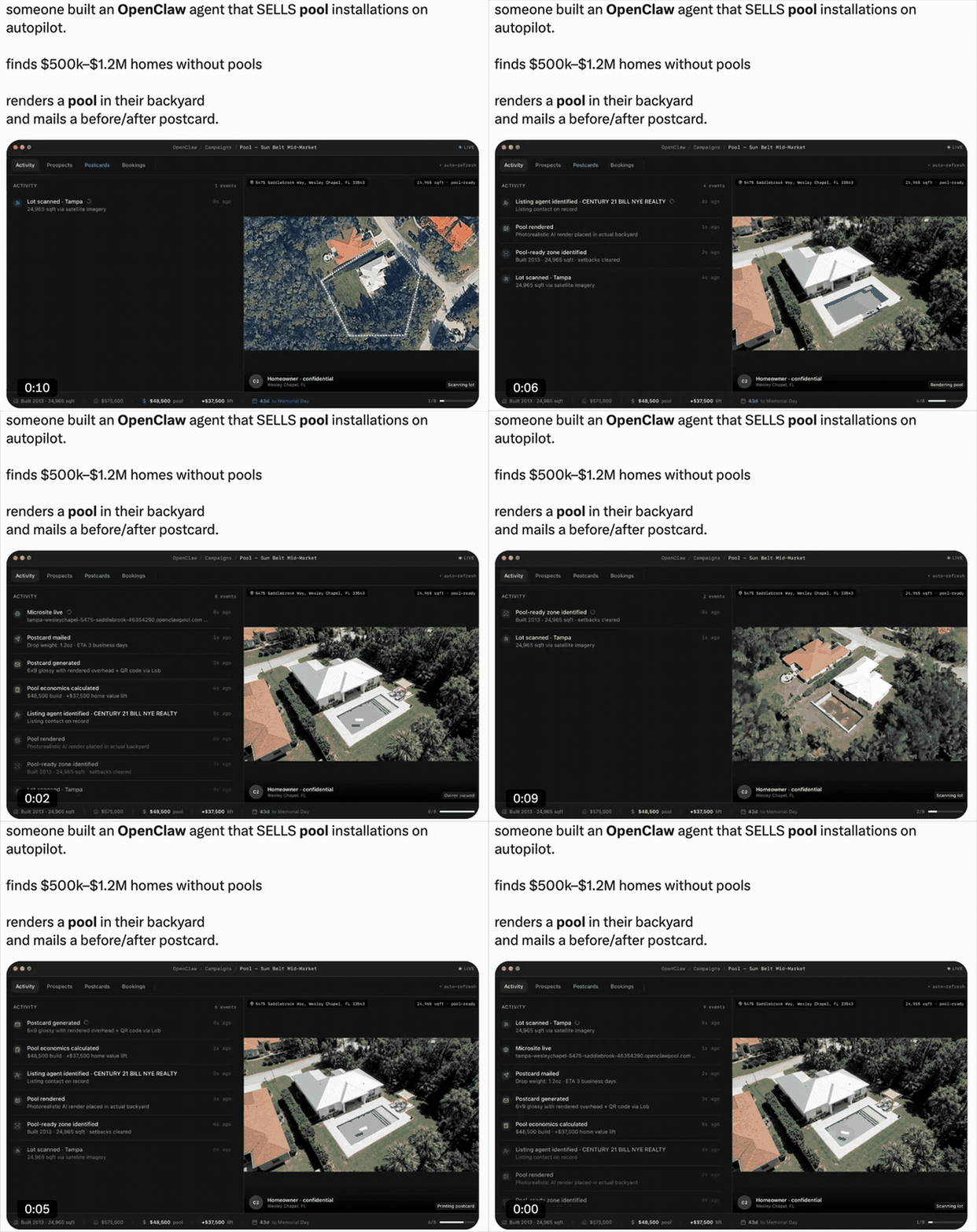
This seems complicated and a bit like magic, but realistically its just a bunch of simple things, that anyone can do, put together into a system.
These emails will show you how to use dozens of different tools and tasks so you'll understand exactly how a system like this can be put together.
What is AI?
In its simplest form, AI is just a pattern machine. It's read pretty much everything on the internet (books, websites, code, conversations, research papers), and then tries to repeat the patterns from that.
It's not like Google, which retrieves existing information. You search, it finds a page someone already wrote.
AI generates new information based on all the previous information it's been fed.
So if you ask a question like, "What's the capital of Texas?". It'll 'remember' all the different info it read on 'capitals' and 'Texas' and see that most of that information also includes 'Austin'. So, it will then answer Austin.
(A critical difference: AI is non-deterministic. If you ask a calculator 2+2 ten times, you get 4 every time. If you ask AI a complex question ten times, you will get ten slightly different answers because it is dynamically predicting patterns, not retrieving a saved file).
The quality of what AI gives you is directly proportional to the quality of what you give it. Vague input = generic output. Specific context = surprisingly good output.
Here's an example of the difference that gets more specific each time
- Make me a meal plan
- Make me a keto meal plan
- Make me a keto meal plan without breakfast and for 1500 calories a day
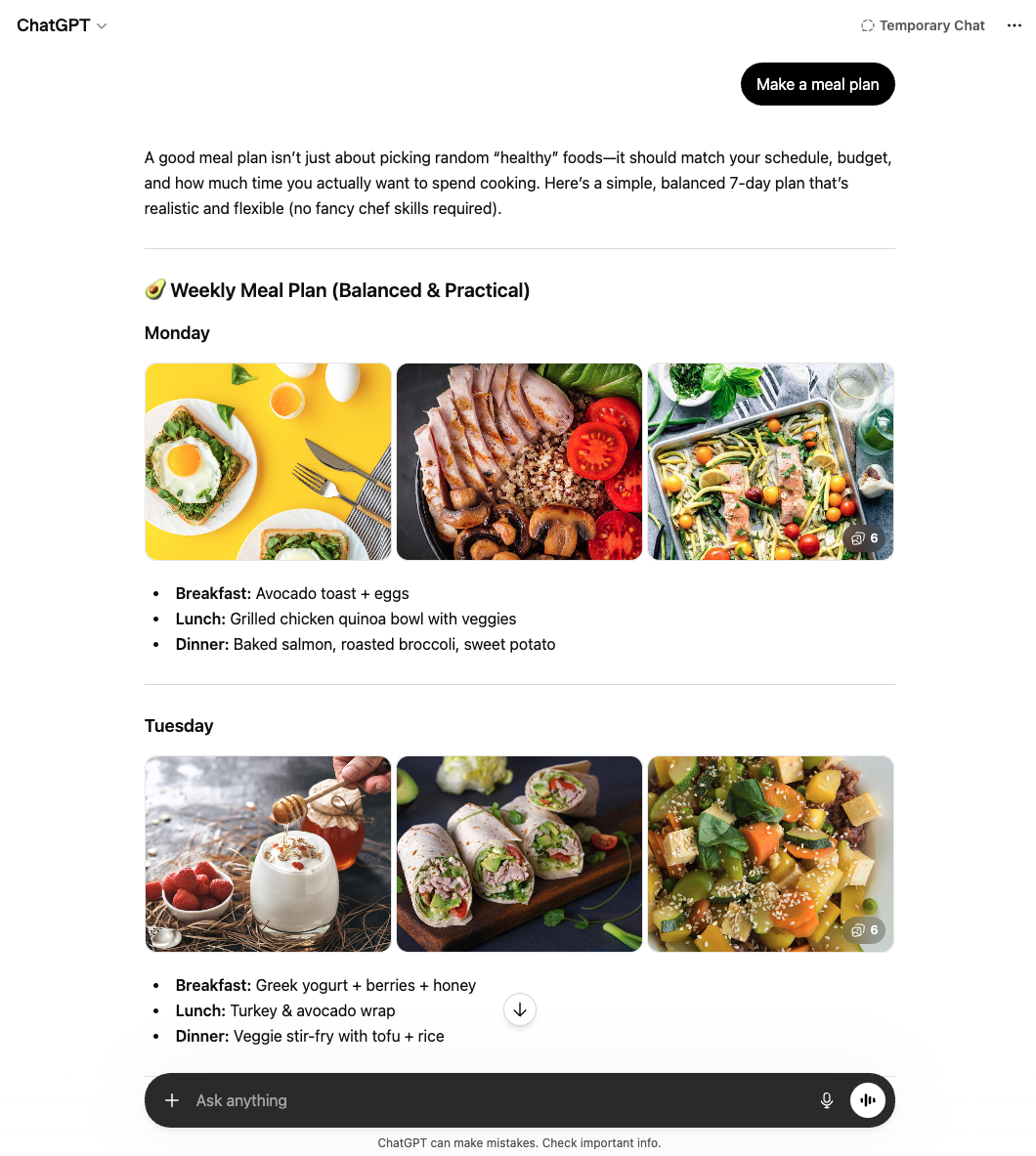 |
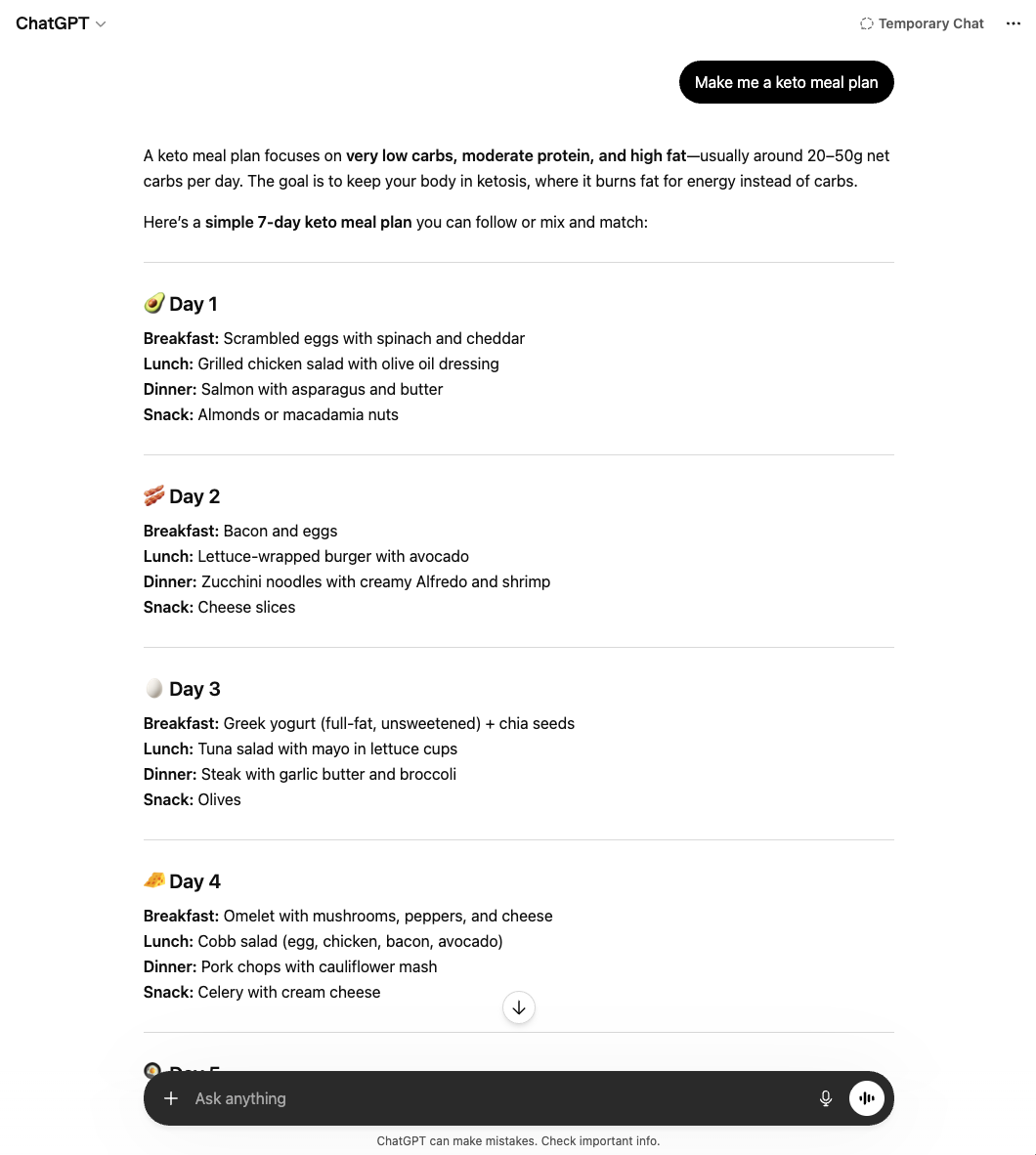 |
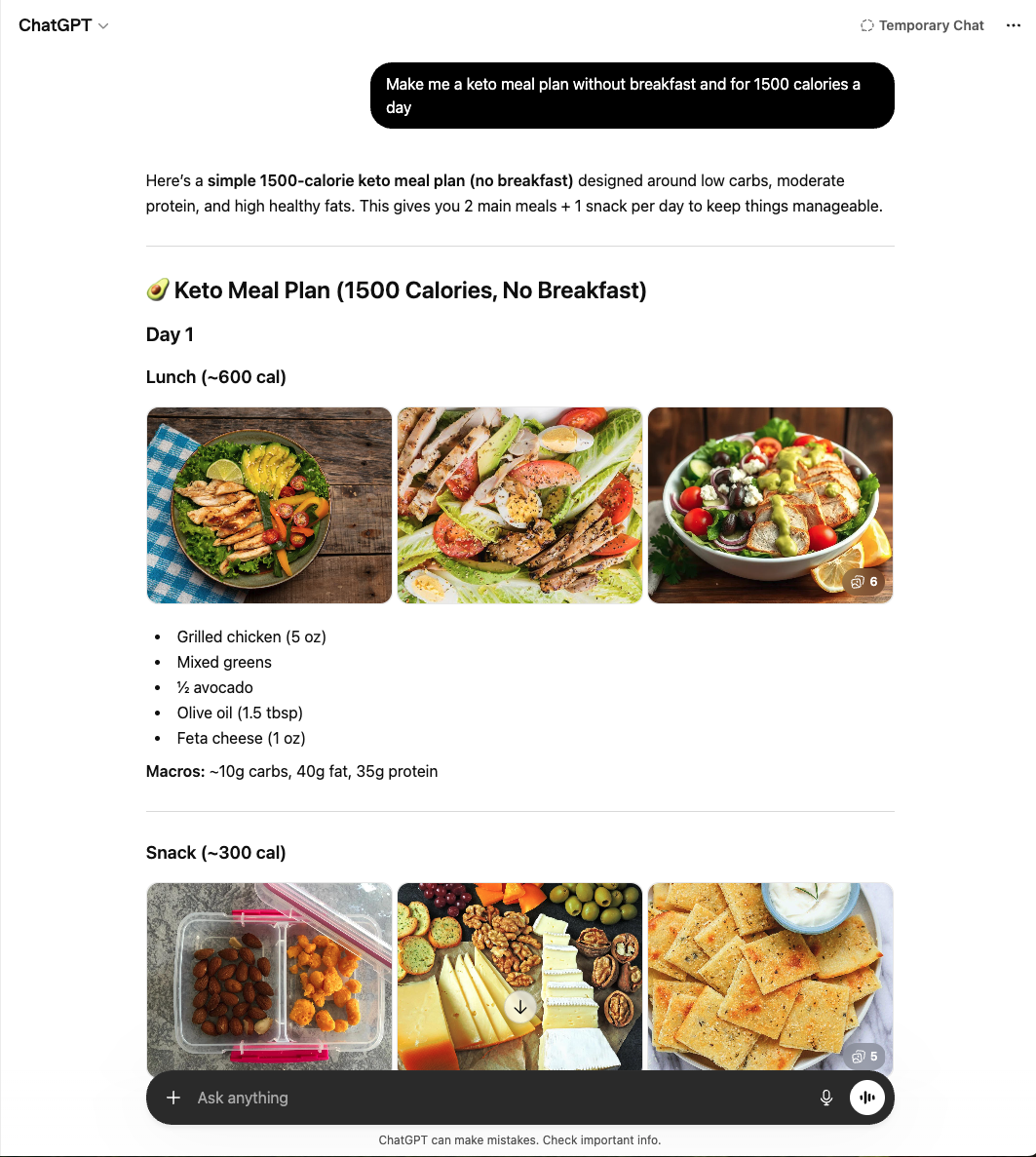 |
That's the entire game, and it's what we'll be sharpening here.
How do people use AI today?
The scale is staggering:
- ~1.3 billion people have used generative AI
- 210 million use ChatGPT every single day
- 2.5 billion prompts are processed daily across platforms
OpenAI published a major study analyzing how people use ChatGPT. The breakdown:
- Practical Guidance (28%) — tutoring, how-to advice, brainstorming
- Writing (28%) — drafting, editing, summarizing, translating
- Seeking Information (21%) — using AI instead of Google
- Technical Help (7.5%) — coding, data analysis, math
- Everything else — image generation, creative writing, games, self-expression
About 70% of ChatGPT usage is personal, not work-related.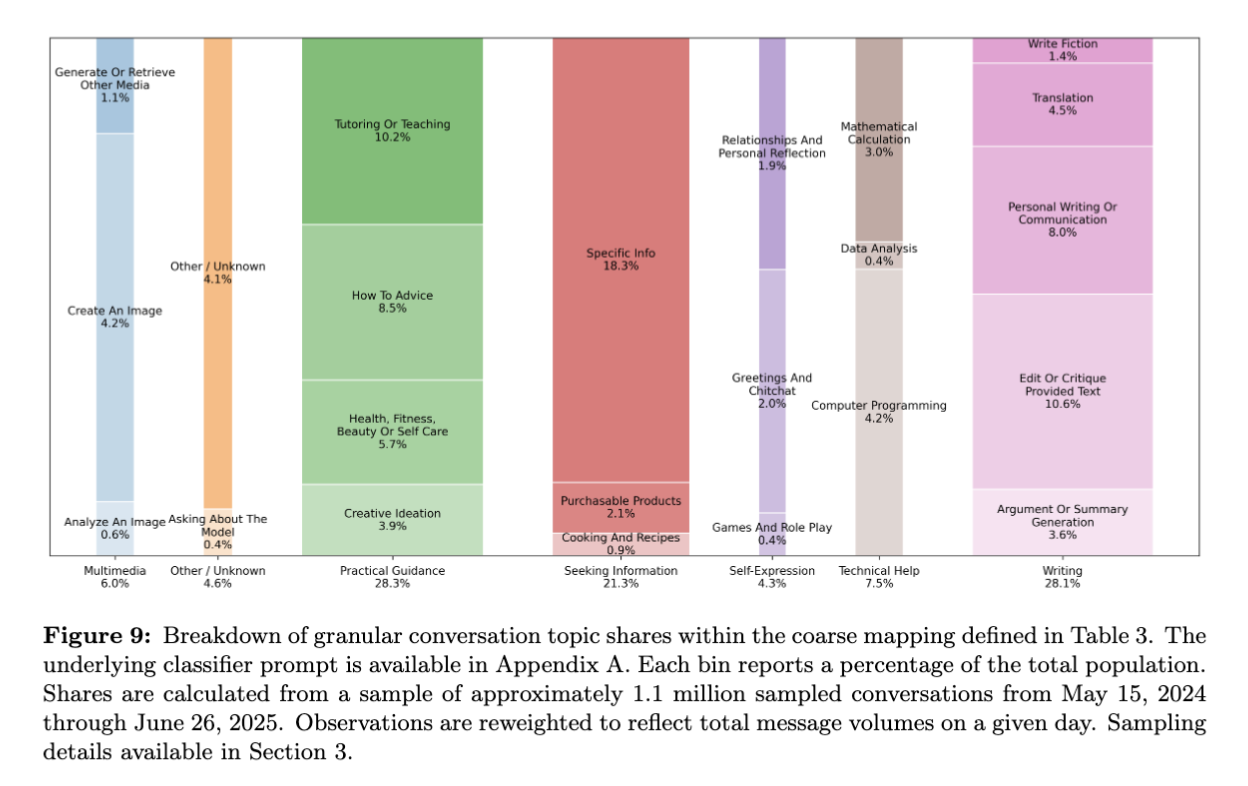
Levels of using AI
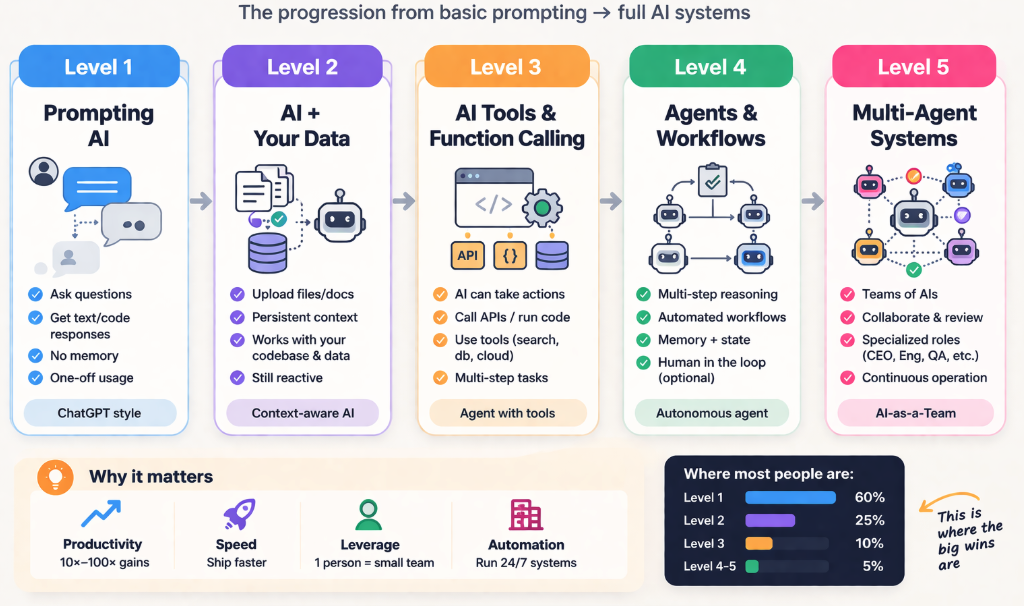
While you might see AI as the same thing as ChatGPT, that's just the first level. By adding pieces together, it can get more and more complex.
Level 1 (Prompting): You ask a question, the AI responds. Your role is simply the Operator.
Level 2 (Context): You feed the AI your specific documents, codebase, or data. You become the Curator.
Level 3 (Tools): The AI can actually take actions like search the web, run a script, read an API. You become the Architect.
Level 4 (Workflows): You set multi-step processes for the AI to run autonomously. You become the Orchestrator.
Level 5 (Multi-Agent): You manage specialized teams of AI agents (e.g., an AI developer, an AI QA tester, and an AI marketer) working together. You become the Strategist.
Future Topics We'll Cover
We aren't just going to look at AI; we are going to build with it. Over the coming weeks, we will cover:
- The Model Landscape: When to use ChatGPT vs. Claude vs. Gemini, and navigating Hallucinations.
- The Socratic AI: How to use AI not to cheat on your work, but to ruthlessly accelerate how fast you learn.
- Next-Gen AI Workspaces: Throwing out old tools and leveraging AI-native spaces like Cursor, Lovable, Claude Code, and Replit.
- Generative Senses: Easily spinning up professional images with Midjourney, generating video with Veo, creating voice clones with ElevenLabs, and churning out AI presentations.
Your AI Usage
Before we get into the heavy hitting tomorrow, we need to calibrate. This curriculum adapts to you. Hit reply to this message and let me know:
- Where are you today? What tools have you tried? (ChatGPT, Claude, Gemini, Midjourney, etc.) How often do you open them? What do you actually use them for right now?
- Where do you want to be? Is this about work? Personal life? Both? Are you trying to save time, make money, learn faster, build something, or just figure out what the hype is about? Be as specific as you can, even if it feels ambitious.
There are no wrong answers. Some people joining this have never opened ChatGPT. Others use it daily. Both are exactly where they should be.
Just reply right to this message!